> For the complete documentation index, see [llms.txt](https://plugin-everything.gitbook.io/docs/llms.txt). Markdown versions of documentation pages are available by appending `.md` to page URLs; this page is available as [Markdown](https://plugin-everything.gitbook.io/docs/controls/width-modes.md).
# Stroke Width & Width Modes
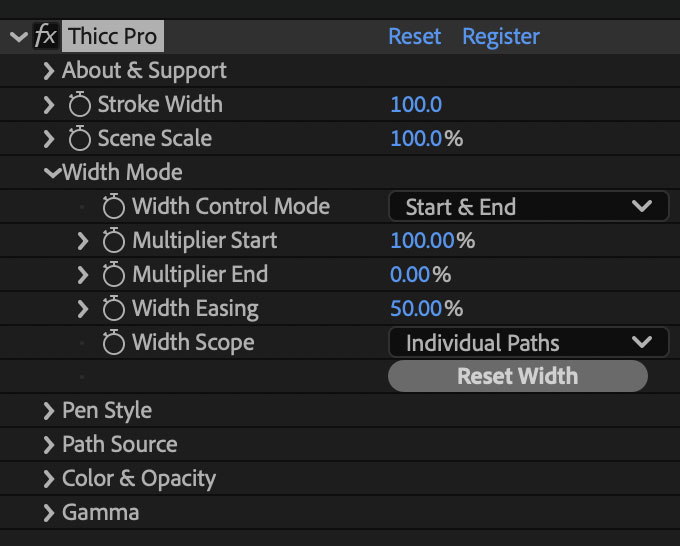
`Stroke Width` sets the base thickness of the stroke. The `Width Mode` group controls how that thickness changes along the path, from a constant line to tapered, bulged, or custom curve-driven profiles.
{% columns %}
{% column %}
{% endcolumn %}
{% column %}
{% endcolumn %}
{% endcolumns %}
Various Width Control Modes with Pen Shape: Flat
{% columns %}
{% column %}
1. `Constant Width`
2. `Start & End`
{% endcolumn %}
{% column %}
3\. `Start Middle End`
4\. `Curve Graph`
{% endcolumn %}
{% endcolumns %}
{% hint style="info" %}
Use `Width Control Mode` to choose the width profile, `Width Easing` to smooth simple profiles, and `Width Scope` to decide how the profile maps across paths, trims, or dashes.
{% endhint %}
## Controls
Stroke Width
#### Stroke Width
`Stroke Width` sets the base thickness of the rendered stroke, measured in pixels.
If `Width Control Mode` is `None (Constant Width)`, this is the stroke's final width before other effects such as `Scene Scale` and repeater width changes are applied.
If a variable width mode is active, `Stroke Width` is the value that the width curve multiplies. For example, a 100 pixel `Stroke Width` with a `Multiplier Start` of 50% and a `Multiplier End` of 25% renders at 50 pixels at the start and 25 pixels at the end.
With `Pen Shape` set to `Sphere (3D)`, the apparent on-screen width is also affected by the active After Effects camera.
Scene Scale
#### Scene Scale
`Scene Scale` enlarges or shrinks the whole Thicc Pro result from the composition center.
Use it when the stroke looks right but needs to be scaled as a complete scene, such as matching a scaled layer, reformatting a composition, or resizing a look without rebuilding width, dash, and repeater settings one by one.
See [Scene Scale](/docs/controls/width-modes/scene-scale.md) for interactions and edge cases.
## Related Pages
* [Scene Scale](/docs/controls/width-modes/scene-scale.md)
* [Width Control Modes](/docs/controls/width-modes/width-control-modes.md)
* [Width Easing](/docs/controls/width-modes/width-easing.md)
* [Width Scope](/docs/controls/width-modes/width-scope.md)